|
By: Paul S Cilwa |
Posted: 10/5/2026
Updated: 10/27/2026 |
|
Page Views: 101 |
| Hashtags: #Software #Windows #Shell #DocumentCentric #DesktopMinder #FileExplorer #Design |
| What it means for a desktop to be document-centric rather than app-centric, and the kinds of document Desktop Minder opens, makes and edits. |
App-Centric and Document-Centric
An app-centric computer is organized around programs. The Start menu is a
list of programs. The taskbar is a row of programs. A file is a thing some
program owns, and the file's icon is the program's logo. When you want to do
something, you ask yourself which program does it, and go there.
A document-centric computer is organized around the things you actually
care about: the photo, the letter, the album, the message from your sister. Each
of those knows what can be done to it, and offers it where you are. There is no
"going to" a program, because the document is already in front of you.
This isn't a new idea. It's what Apple promised with OpenDoc in the 1990s and
what Microsoft half-built with OLE, and both were abandoned, mostly because they
asked every software company in the world to rewrite their products. Desktop
Minder doesn't ask anyone anything. It just opens the file itself, and for the
files it doesn't know, it hands off to Windows exactly as Explorer would. The
list of files it knows grows as I go.
Every Document Is a Collection
The idea that holds the program together is that every document is made of
smaller documents, all the way down.
- A folder is a collection of documents.
- A picture is a collection of pixels, or of drawing instructions.
- A recording or a film is a collection of moments, which can be
one unbroken take or a dozen clips that can be rearranged.
- A moment is a collection of frames, and a frame is a picture—so
one day the picture editor will reach into a film without needing a new idea.
- Text is a collection of paragraphs, of words, of characters.
Why does that matter to you, rather than to me? Because it means that wherever
you point, the program can tell you what's there and what can be done to it, and
it never has to invent a category to do so. Right-click a picture you're changing,
and the menu is headed by nouns you can already see on the screen—this
red, the whole picture, Sunset.jpg, Photos—never by
"Tools" or "Options" or "Advanced," each offering what can be done to it, under its
own name. The recording and video editors point the same way: right-click a stretch
of sound or a moment of film and the menu is about that, then the layer or track
it's on, then the recording or video, then the file, then the folder. The same way of
pointing is meant to reach every kind of document.
Putting One Document Into Another
If documents are the thing, any document should be able to go into any other,
wherever that makes sense. You can't meaningfully drag a video onto a printed page,
but you can drag one onto a web page you're designing; and you can drag text onto a
video, or onto a picture. Email is the kind of document that already holds most of
the others, and everything else is meant to follow it as far as it sensibly
can.
The machinery for that is built: every drag, drop and paste goes through one set
of rules, and whatever is under the pointer says, before you let go, whether it will
take what you're carrying, and why not if it won't. A file goes to a folder,
obviously; but so does a paragraph of text from Word, which becomes a .txt
file there, and a selection of pixels, which becomes a .png. Every place in
the program a picture belongs—a desktop's background, an album's cover, a
contact's photo—takes a picture file dropped on it, and a contact's photo takes
a dragged-out selection too; a broken shortcut takes the
thing it should point at. Paste is the same act from the clipboard, so a folder's
Paste and a drop onto it can never disagree about what they've been handed.
What isn't built yet is most of the documents' own halves. Drop something on an
open text, picture or film and it will usually tell you it takes nothing dropped on
it. The exceptions so far: a web page in Edit takes pictures, a video's layers take
films and sounds, and a recording's tag sheet takes a cover. Each kind's page says
what it should take, and how far that has got.
The rules are the same whatever the target and whatever the drive. A plain drag
moves. Ctrl copies. Ctrl+Shift makes a shortcut. And a program
dragged with no key held makes a shortcut, because nobody has ever wanted to move
Word.exe onto their desktop.
More Examples
Some documents are on their way to a page of their own. In the meantime:
A Web Page
A shortcut to a web page is a document whose content happens to be somewhere
else. Open it and the page appears in the middle of the screen, with
Back, and it follows links, because a page you've gone to is a page you
may go on from. It sits in the Documents pane beside your other files, and the
Internet desktop starts out full of them: your bookmarks, gathered from every
browser on the machine, as shortcuts in the folders you'd already sorted them
into. Close the page with the X and everything it was managing goes with it;
Back opens it again, as new.
Contacts and Notes

Your contacts are a folder, one vCard file for each person, a format
every phone and mail program can read. Inside it, a basket—Family, Medical,
whatever you like—is a folder too. Open it and you get a table you edit in place,
with the baskets down the left, and a contact's own file opens as the contact, with links to
other contacts, written at both ends. Drop a vCard file on the table and it's merged in.
Sticky notes are text files in a folder, shown in a pane with the first few lines of
each as its tile; open one and it's a text document, because it is one.
A Broken Shortcut

My favorite small example. Double-click a shortcut whose target has gone, and
Windows puts up a box saying the item has been changed or moved, and offers to
delete it. But a broken shortcut isn't rubbish. It's a name, a place on your
desktop and often an icon you chose, pointing at a drive that isn't plugged in
today or a folder that moved last year. In Desktop Minder it opens as a
document about where it points, and offers three ways to mend it: drop the thing
on the page, type or paste the new path, or go and find it.
The Desktop Itself
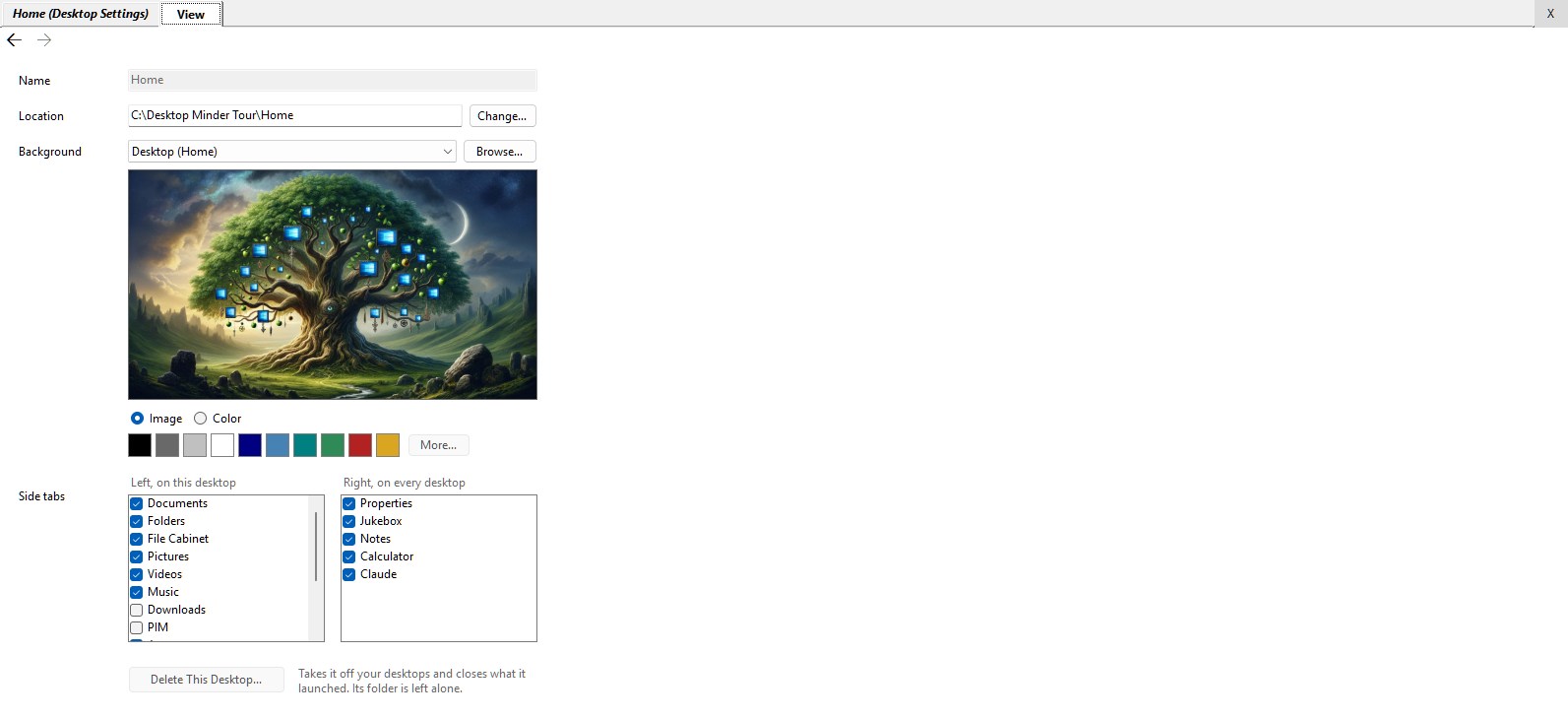
Each desktop's settings—its name, its folder, its wallpaper—are a
document too: a sheet, opened from the desktop's tab, shown in the middle of the
screen like anything else. Type a new name and press Enter, or just move on, and
it's on the tab at once. Pick a wallpaper and it's behind you as you pick it. Nothing waits
for an OK, because there isn't one.
The Kinds of Document
Folders and the launchers that show them, then text, pictures, sound, film and
mail, each with how to look at it, how to make a new one, and how to change it:
Launchers
|
By: Paul S Cilwa |
Posted: 10/25/2026
Updated: 10/25/2026 |
|
Page Views: 23 |
| Hashtags: #Software #DesktopMinder #Launcher #Panes #Folders #Apps #Pin #LeftStrip |
| The panes down the left side of each Desktop Minder desktop: the standard tabs, how to open a launcher on any folder (and as many as you like), and how to use and close them. |
| Estimated reading time: 8 minute(s) (1725 words) |

Down the left side of every desktop is a strip of tabs, and each tab opens a
launcher: a pane of tiles for a folder—or for your drives, the Recycle Bin, a
music library. The first three, Documents, Folders and Apps, are the
desktop's own folder shown three ways, so the programs aren't mixed in with the documents.
Beyond those there are more standard tabs you can switch on, and you can open a launcher on
any folder you like, as many as you like; the ones you've pinned are there again next time.
Where a folder open in the View is a document you read, a launcher is a place you
start from.
Folder Documents
|
By: Paul S Cilwa |
Posted: 10/25/2026
Updated: 10/25/2026 |
|
Page Views: 21 |
| Hashtags: #FileExplorer #Columns #Sort #Rename #Compress #Software #DesktopMinder #Folders #DragAndDrop |
| How to open, look at, make and change a folder in Desktop Minder: a listing in place, with columns that depend on what is in it, tags you can type into, and its settings kept inside it. |
| Estimated reading time: 11 minute(s) (2554 words) |

Open a folder and you get a listing, in place, with Up, Back
and Ahead arrows like a browser's. So far, so Explorer. The difference is in the
columns. Desktop Minder offers the handful every file has—size, dates,
attributes—plus whatever the kinds of file in this folder have to say for
themselves. A folder of MP3s offers Title, Artist, Length and Bit
rate; a folder of photographs offers Width, Height and F-stop; a
folder of neither offers neither. Columns that can be written can be edited right in
the cell, the way you'd rename a file, so fixing an album's track titles doesn't mean
opening a tag editor. Each folder remembers its own columns, its own sort and its own
icon, in a small text file inside it, so if you move the folder, all of that moves
with it.
Text Documents
|
By: Paul S Cilwa |
Posted: 10/5/2026
Updated: 10/25/2026 |
|
Page Views: 91 |
| Hashtags: #Software #DesktopMinder #Text #TextEditor #RichText #HTML #FindandReplace #Word #Styles #Themes |
| How to read, make and edit text in Desktop Minder: plain text, rich text, Word documents and web pages, each opened to be read, edited on purpose, and saved when you put it down. |
| Estimated reading time: 12 minute(s) (2736 words) |
A text document opens on its Read tab, looking just as it will
when you edit it, but read-only, because editing is a deliberate act, not something
you fall into by clicking a file. Click Edit to write in it. There is no Save
button: a document is written back when you put it down, like a sheet of paper. There
are four kinds—plain text, rich text, Word documents and web pages. A web
page gets a real browser to be read in, a paragraph editor to be written in, and the
editor from Visual Studio Code for its source. Sticky notes are text documents too,
because that is all a note is.
Image Documents
|
By: Paul S Cilwa |
Posted: 10/5/2026
Updated: 10/25/2026 |
|
Page Views: 93 |
| Hashtags: #Software #DesktopMinder #Images #Pictures #PhotoEditor #Selections #Undo #Crop |
| How to look at, make and change pictures in Desktop Minder: an editor with four tools, a menu about whatever you point at, and a history from which almost any step can be taken out. |
| Estimated reading time: 11 minute(s) (2564 words) |
A picture opens on its Look tab, fitted to the window, and most
pictures are only ever looked at, so nothing about the editor is allowed to slow that
down. Click Change and you have the editor, which is built the other way round
from the ones people know. There is no Filters menu and no wall of tools. A click
means one of four things—point, box, freehand, brush—and that's the
entire toolbar. What can be done is on the right-click menu of whatever you
pointed at: right-click a red pixel and the menu is about that red—select
everything like it, replace it, make it see-through—and then goes on to the
whole picture, the file, and the folder it's in. Every change is kept as a step, so
undo is cheap and a change made ten minutes ago can usually be taken out on its
own.
Audio Documents
|
By: Paul S Cilwa |
Posted: 10/5/2026
Updated: 10/25/2026 |
|
Page Views: 102 |
| Hashtags: #Software #DesktopMinder #Audio #Music #MIDI #Jukebox #Tags #MusicLibrary #Recording #AudioEditor |
| How to listen to, make and edit sound in Desktop Minder: tracks, music libraries and one Jukebox for everything; recording, cutting and mixing in the Edit tab; and tags, covers and names for any number of recordings at once. |
| Estimated reading time: 14 minute(s) (3158 words) |

A track opens on its Listen tab with its cover on it, and plays when you
press Play. There is one Jukebox, because there is one pair of speakers
and one listener: any track, album or folder of music, wherever you see it, offers
Play with Now, Next and Last under it, and they all feed the
same queue. A music drive that has been scanned can be opened as a library—every
track at once, or by artist, album or genre—and an artist inside it opens as the
folder it is, because it is a folder. Tags and covers can be changed for any
number of recordings at once, and the Edit tab records sound and cuts, fades
and mixes it, as a project that publishes back as an ordinary recording.
Video Documents
|
By: Paul S Cilwa |
Posted: 10/5/2026
Updated: 10/25/2026 |
|
Page Views: 91 |
| Hashtags: #Software #DesktopMinder #Video #Film #VideoEditor #FrameStepping #ffmpeg #Layers |
| How to watch, make and edit films in Desktop Minder: playing the moment you open one, exact frames, picking up where you stopped, and an editor in which the video is the document. |
| Estimated reading time: 13 minute(s) (3084 words) |

A film opens and starts playing, because opening a film is asking
to watch it. Close it halfway and open it again next week, and it picks up five seconds before where you stopped; pause it, and it will step one exact frame at a time. A folder of
films offers Last watched and Resume at columns, and a switch to hide the
ones you've finished. A film can be edited, too, and here the video is the
document. In Premiere or OpenShot you go into the program, open a "project," work
on it, and at the end "export" a film: a second, separate thing you then have to go
and find. Here you make a video from a folder's New menu, arrange its footage on
layers, split it and trim it, and put it down—and the film is brought up to date
by itself, in the background. There is no Export step, because there is nothing to
export.
Email in Desktop Minder
|
By: Paul S Cilwa |
Posted: 10/5/2026
Updated: 10/25/2026 |
|
Page Views: 90 |
| Hashtags: #Software #DesktopMinder #Mail #POP3 #Mailbox #Contacts #Spam #InProgress #email |
| Mail in Desktop Minder: mailboxes that are folders, messages that are files, and the message as the one kind of document made of all the others. Nearly done. |

Email is where all the other kinds of document meet. A message is
text, often formatted; it carries pictures, some inside it and some only pointed
at; it carries attachments of every kind; it links to the web. In Desktop Minder
there is no mail program to hold all that. A mailbox is a folder with a folder
inside it for each basket—Inbox, Unknown Senders,
Newsletters, Spam, Sent, Drafts and Outbox—and
every message is a file whose name begins with the date it was written, so you sort,
drag and delete messages as you would any file. The ones you haven't read are in bold.
Open one and it's shown in a sealed box that runs no scripts and fetches nothing from
the internet until you ask, which means the tracking pixel that tells the sender the
moment you opened it never gets sent. Mail from your contacts lands in the Inbox,
strangers wait in Unknown Senders, where Add to Contacts... makes one a contact, bulk mail goes to Newsletters, and what Spam Watch recognizes goes to Spam. A reply is a document too, and Send puts it in the Outbox, from which it goes when the network is there.