|
By: Paul S Cilwa |
Occurred: 7/27/2023
Posted: 2/10/2026 |
|
Page Views: 213 |
| Hashtags: #Programming #ChatGPT #VBNET #MusicLibrary |
| ChatGPT can write useful programs for you if you just know how to ask. |
| Estimated reading time: 7 minute(s) (1482 words) |
This is my naming convention for music files. For example,
\Albums
\Helen Reddy
\(1987) Helen Reddy's Greatest Hits (And More)
\[03] Leave Me Alone (Ruby Red Dress).flac
is the first track, titled "Leave Me Alone (Ruby Red Dress)" from Helen Reddy's album
"Helen Reddy's Greatest Hits (And More)", which was released in 1987,
and which happens to be a FLAC-extension file. (It could be any music format.)
As it happens, for one reason or another, I may be missing a track. For example, if
it came from one of the CDs in my extensive collection, one of the tracks may be damaged.
Or if it came from one of my older vinyl LPs, it may have been too scratched for
me to recover. In any case, a track might be missing. But I now have additional sources
for tracks, for example, buying them from Amazon Music. So I'd like to be able to
quickly scan my whole library of over 122,000 tracks in nearly 10,000 albums,
and see which ones are missing.
The problem with that, of course, is that, without manually reading each track number
aloud, the brackets and digits and letters quickly blur together. I need a way to
just sort of run through every file name in every folder beneath \Albums
and look to see if any tracks are missing, with the understanding that I'm only checking
for missing middle tracks, as I don't have a way from my own data to know the
total number of tracks in the album. But it's the missing middle tracks that
trigger my OCD, so I'll be content to just locate those.
In any case, as a retired computer programmer, it's natural for me to just write the
program, which would be trivial. A recursive spidering routine starting at "m:\Albums"
(I keep my music on a dedicated drive located at m:), a counter, to be
reset in each album and incremented with each track, displaying a message if the next
track "[04] song title.mp3" doesn't match the expected counter value "03". (Then set
the counter to "04".)
So I opened up the ChatGPT site on my browser,
logged in to my grandson's ID (there is a charge if you do anything serious),
and gave it instructions:
I need, in VB.net, the Sub Main for a Console app, that will, starting at "m:\Albums\",
spider through all subfolders, looking for music files, then examining the track number
and displaying a line on the console for any folder that is missing a track.
If "[01]" is missing, or any other number between [01] and whatever the highest track
number present in the folder is, that's when I want the folder name.
If a track is missing, once the folder name is displayed, inspection of that folder can end.
Please note that there are a few instances where the track number consists of 3 digits.
Sure, I can help you write a VB.net Sub Main for a Console app that will achieve the described functionality.
We'll use recursion to traverse through all subfolders and check for missing tracks. Here's the code:
Imports System.IO
Imports System.Text.RegularExpressions
Module Module1
Sub Main()
Dim rootFolder As String = "m:\Albums\"
If Directory.Exists(rootFolder) Then
ProcessFolder(rootFolder)
Else
Console.WriteLine("The specified root folder does not exist.")
End If
Console.WriteLine("Press any key to exit.")
Console.ReadKey()
End Sub
Sub ProcessFolder(folderPath As String)
Dim musicFiles = Directory.GetFiles(folderPath, "*.mp3") ' You can add other music formats if needed
If musicFiles.Length > 0 Then
Dim trackNumbers As New List(Of Integer)()
' Extract and store the track numbers from the filenames
Dim trackNumberRegex As New Regex("\[(\d{1,3})\]")
For Each musicFile In musicFiles
Dim fileName As String = Path.GetFileNameWithoutExtension(musicFile)
Dim match As Match = trackNumberRegex.Match(fileName)
If match.Success Then
Dim trackNumber As Integer = Integer.Parse(match.Groups(1).Value)
trackNumbers.Add(trackNumber)
End If
Next
' Sort the track numbers in ascending order
trackNumbers.Sort()
' Find missing tracks and display folder name if any are missing
Dim highestTrackNumber As Integer = 0
For Each trackNumber In trackNumbers
If trackNumber > highestTrackNumber + 1 Then
Console.WriteLine($"Missing track in folder: {folderPath}")
Exit Sub ' Inspection of this folder can end since a track is missing
End If
highestTrackNumber = trackNumber
Next
End If
' Recursively process subfolders
Dim subfolders = Directory.GetDirectories(folderPath)
For Each subfolder In subfolders
ProcessFolder(subfolder)
Next
End Sub
End Module
Make sure to replace "m:\Albums\" with the actual path of your root folder. This code will search
for music files with the ".mp3" extension but can be easily modified to handle other formats as well.
The trackNumberRegex extracts the track number from the filename, and we use a List(Of Integer) to
store the track numbers for each folder. By sorting the list, we can easily identify missing tracks. If a track
is missing, the folder name will be displayed, and the inspection of that folder will stop, as per your
requirements. The code will continue to process other folders in the root directory and its subfolders.
Keep in mind that this code assumes the track numbers are enclosed in square brackets as described
in your naming convention (e.g., [01], [02], [003]). If your naming convention changes in the future,
you may need to adjust the regular expression accordingly.
Wow. Just like that?!? But—
Can you fix it so it works with any music file format (.flac, .ogg, etc.)?
Absolutely! To support multiple music file formats like .flac, .ogg, .wav, etc.,
you can modify the code to check for a list of allowed extensions rather than just .mp3.
Here's your updated VB.NET code that supports a list of common music formats:
Imports System.IO
Imports System.Text.RegularExpressions
Module Module1
Sub Main()
Dim rootFolder As String = "m:\Albums\"
If Directory.Exists(rootFolder) Then
ProcessFolder(rootFolder)
Else
Console.WriteLine("The specified root folder does not exist.")
End If
Console.WriteLine("Press any key to exit.")
Console.ReadKey()
End Sub
Sub ProcessFolder(folderPath As String)
' Define supported audio file extensions
Dim musicExtensions As String() = {".mp3", ".flac", ".ogg", ".wav", ".aac", ".m4a", ".wma", ".alac"}
Dim musicFiles As New List(Of String)()
' Collect all music files with supported extensions
For Each ext In musicExtensions
musicFiles.AddRange(Directory.GetFiles(folderPath, "*" & ext))
Next
If musicFiles.Count > 0 Then
Dim trackNumbers As New List(Of Integer)()
' Extract and store the track numbers from the filenames
Dim trackNumberRegex As New Regex("\[(\d{1,3})\]")
For Each musicFile In musicFiles
Dim fileName As String = Path.GetFileNameWithoutExtension(musicFile)
Dim match As Match = trackNumberRegex.Match(fileName)
If match.Success Then
Dim trackNumber As Integer = Integer.Parse(match.Groups(1).Value)
trackNumbers.Add(trackNumber)
End If
Next
' Sort the track numbers in ascending order
trackNumbers.Sort()
' Find missing tracks and display folder name if any are missing
Dim highestTrackNumber As Integer = 0
For Each trackNumber In trackNumbers
If trackNumber > highestTrackNumber + 1 Then
Console.WriteLine($"Missing track in folder: {folderPath}")
Exit Sub ' Inspection of this folder can end since a track is missing
End If
highestTrackNumber = trackNumber
Next
End If
' Recursively process subfolders
Dim subfolders = Directory.GetDirectories(folderPath)
For Each subfolder In subfolders
ProcessFolder(subfolder)
Next
End Sub
End Module
Changes Made:
- Added support for various audio formats via the
musicExtensions array.
- Looped over each extension and gathered matching files using
Directory.GetFiles.
So I looked over the code, of course; and, while it wasn't exactly the way I would have written it,
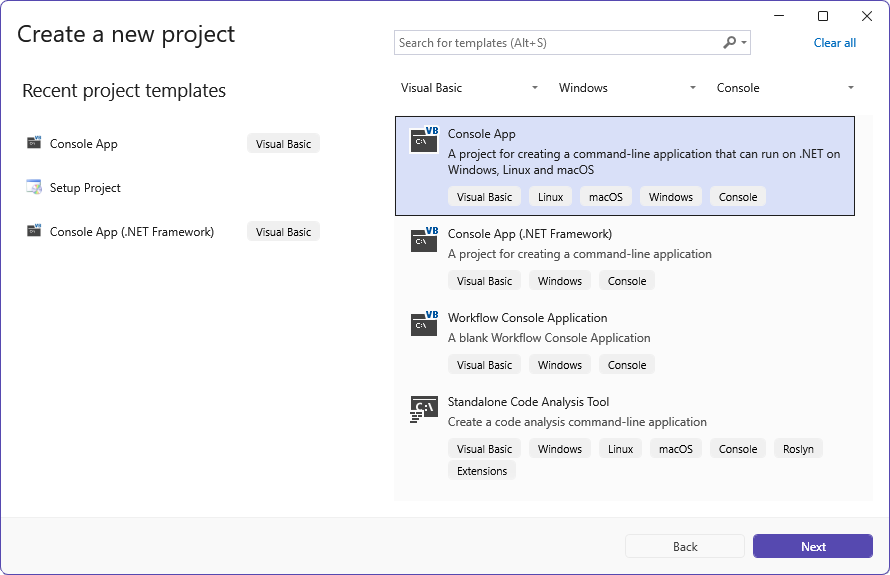
I couldn't find anything wrong. So with Visual Studio I created a new Visual Basic Console project…
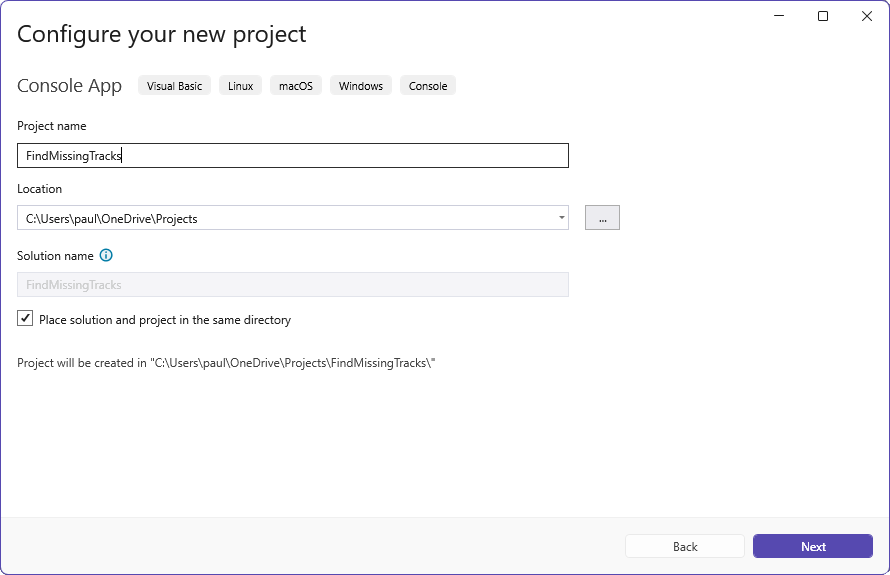
called it "FindMissingTracks"…
Selected the latest (at the time) .net library…
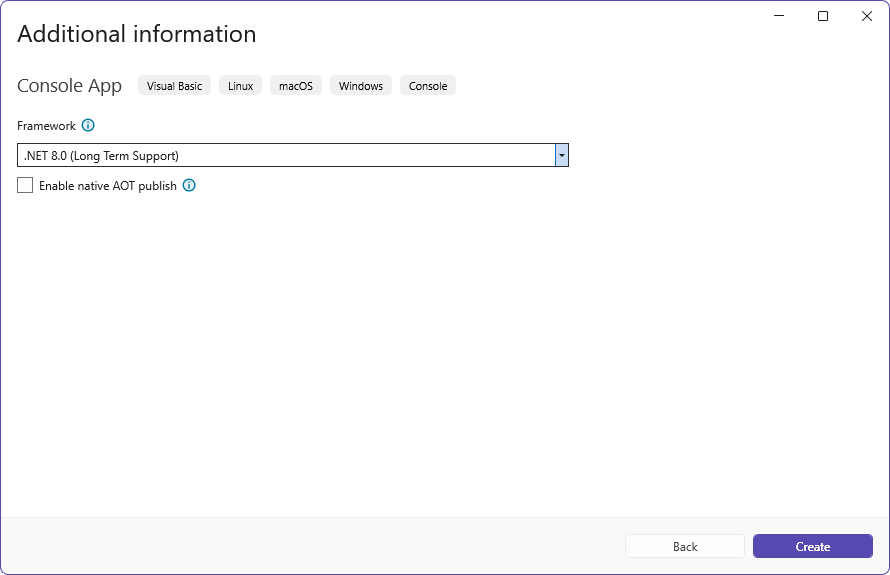
and pasted the code into the resulting code window—without errors, I'm happy to note.
A deep breath, and a tap on the F5 key to run it.
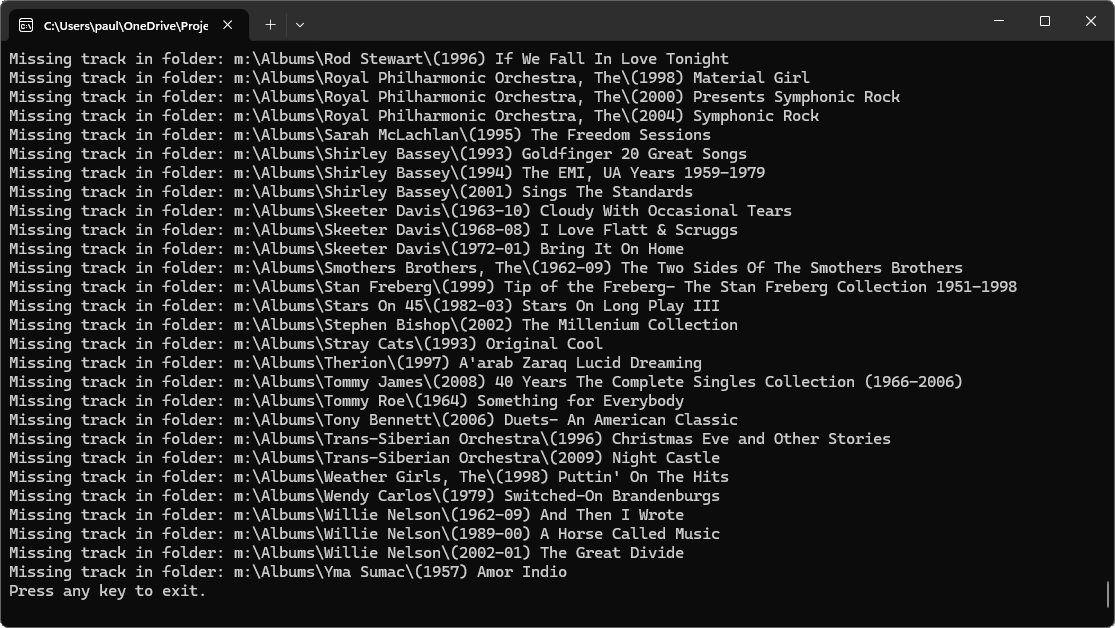
Wow. And it works! If I hadn't spent all this additional time documenting the process,
it would have taken far less time to have ChatGPT write the program than it would have taken
me even to just type it.
Would I recommend getting code from ChatGPT, or, indeed, any A.I., and running it unchecked?
Of course not. I don't even recommend watching the news without verifying what it says. But
if treated as a junior programmer, an amanuensis if you will, whose work you definitely check
before turning it loose on the world, I feel strongly that this will be, for programmers,
an amazing tool that will enhance your productivity to an unbelievable degree.