|
By: Paul S Cilwa |
Posted: 1/22/2016 |
|
Page Views: 577 |
| Hashtags: #Endianness #Computers #HowComputersWork |
| All about little-endian, big-endian, and bi-endian storage of computer data. |
| Estimated reading time: 10 minute(s) (2185 words) |

The first thing to understand is
that everything in a computer must be represented numerically. Words, colors,
photos, videos, music—all the things in our world that exist in gradations, or
what we call analog—all of these must be represented by numbers, the one thing
they all have in common.
We live in an analog world. That is, nothing in the real world is an on/off proposition.
In English, there are 26 letters in the alphabet, not two. There are as many colors as we
can create names for, not just "color" and "monochrome". The amount of light also varies
infinitely in intensity; it's not just dark or light.
Mathematically, everything in the real world can be represented by numbers; and, since
any computer is, by definition, a number-cruncher, the first trick is figuring how
that representation should look. Words, for example, are made up of letters, and each letter can
be assigned a unique number, for example, from 1 to 26, or 52 if you need to store both upper and
lower case. Colors are made up of intensities of red, green and blue. Photos are grids of colors.
Videos are sequences of photos. Music is a sequence of sound wave intensities over time.
It turns out that it's pretty easy to represent the real world using numbers.
But it also turns out that trying to build a computer to work with those numbers was trickier.
We refer to a series of numbers that can fall into a range (for example, the digits 0 through 9)
as analog. We live in an analog world. So it was natural that the first attempts at building an
electronic computer used an analog model. But that required using a distinct voltage to represent each possible
value from 0 to 9, and such circuitry turned out to be extremely expensive to build, and was never very reliable.
However, there's a trick that can bypass that issue.
When we think of numbers, we think in what mathematicians call "Base 10". This is a number range,
based on our 10 fingers, with 10 digits (from 0 to 9) and a column-based system where the rightmost columns stands
for the number of ones; the next column, tens; the next, hundreds, and so forth.
But Base 10 is, at its heart, arbitrary. If humans had eight fingers, we'd undoubtedly developed a Base 8
system, where the rightmost column is still ones, but the next is eights, the next is 64s, and so on.
In terms of computers, Base 8 doesn't buy us anything; it's still analog. But there's one number base
that becomes easy to compute with electronically, and that's Base 2, because with Base 2 there are only
two digits: 0 and 1. And those two digits can easily be represented by two states, ON and OFF. That's a simple switch,
and we've been doing switches in electricity almost as far back as Franklin and his kite.
In Base 2, the first column is ones; the second is twos; the third is fours. So any Base 10 number can
be represented in Base 2, with more digits than in Base 10 but no less accuracy.
Another term for Base 2 is binary, which is why we sometimes refer to modern devices as "binary computers".
Another common term is "digital computers", since all values must be converted to numeric digits, regardless of base.
But at the present time all computers are binary and there's no reason to think that will change any time soon.
Therefore binary computers are, at their essence, simply a collection of on/off switches.
Billions of on/off switches, to be sure; but on/off switches nonetheless. And a
single on/off switch can hold either of two values: ON and OFF.
The brilliant solution that makes digital computers possible, was the idea that one
of those values—ON, let's say—can be represented by "1", while OFF
can be represented by ZERO. That one, simple, concept makes a digital ON/OFF switch a binary digit. (Binary,
because it can hold either of two values.)
But computer programmers will never use five syllables when one will do; and so "Binary digit" became
contracted to "bit". So, that's what a bit is: a single binary digit with a
value of either 0 or 1.
That's adequate to represent yes and no, true and
false, or even up and down. But to be useful, really useful, we need to be able
to put this together to represent larger numbers. And doing that is accomplished
by working in base 2.
Binary digits work just the same way. But there are only two digits, 0 & 1, to
work with. They allow us to deal with the values 0, and 1. But how do we
represent the second column? Simply by adding a column to the left of the first bit, which
we will call the twos column. So a 1 followed by a 0 in binary means the value
two.
Since single bits are of such limited use, bits are gathered
together into groups called bytes. Since a byte holds eight bits, a byte can
contain a value from 0 to 255.
The number of bits in a byte is actually
arbitrary, but bytes have contained 8 bits for so many decades now that it is
unlikely to change.
But how is a color to be represented in numbers? Or for that matter, how about a simple word? Or even a
single letter?
The answer is that those representations are, basically,
arbitrary. We could, for example, make the following decision and assign numeric values
to the letters of the alphabet.
| Letter |
Value |
| A |
1 |
| B |
2 |
| C |
3 |
| Z |
26 |
However, me deciding upon the above values doesn't automatically require any other manufacturer
to follow the same scheme. Yet it's essential that everyone agree on the encoding of letters, or
any document you create on my computer could not be read by any other computer.
But because they have to be agreed upon, we don't call them
arbitrary; we call them standards.
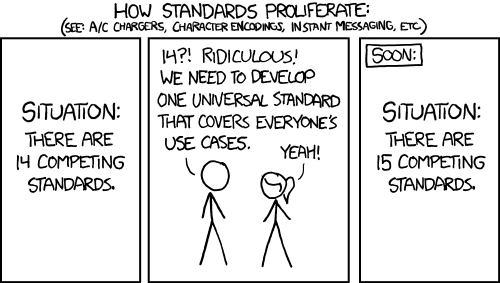
There are two forces driving
standards: the effectiveness of the standard, and momentum. One of the earliest
standards for storing letters is called EBCDIC (Extended Binary Coded Decimal
Interchange Code) and, because it was promulgated by IBM, it grabbed a lot of
momentum even though it had a number of design flaws. For example, lower case
letters had smaller numeric values than uppercase letters, which meant that they
sorted ahead of upper case letters.
ASCII (American Standard Code for
Information Interchange) was the next attempt at formalizing the numeric codes
for letters, digits and punctuation. Its advantage was that the sort order
matched what people expected. Its disadvantage, which took an embarrassingly
long time to acknowledge, is that it only provided encoding for English letters
and common American punctuation. Not even all Danish or French letters were represented;
and just forget about languages such as Chinese or Arabic, which don't use the
Roman alphabet at all.
But why not just add or extend the ASCII and
coding to accommodate all those other characters? To answer that we have to
examine how, exactly, numeric values are stored in the computer.
Bytes, Words, Doublewords and Quadwords
The problem was that the EBCDIC and ASCII standards each took one byte to store one letter, digits,
or punctuation mark. A byte can hold 256 values (usually, from 0 to 255). But there are
far more than 256 characters used among all the languages in the world. In fact, there's more than
twice that. A single bit would double the available values, but computer construction makes it
much faster to access a multiple of bytes than a non-byte random number of bits. And so,
by doubling the size of the memory allocated to a single letter to two bytes, we
allow for 65,536 different characters to be represented.
Two bytes used together, is called a word. Two words can also be strung together to make a doubleword (32 bits)
and two doublewords (64 bits) make a quadword.
Modern PCs do their fastest processing with 64 bits, which is why you'll see Windows come with a
64-bit operating system option.
Addresses
All that memory must be accessed by the operating system as well as by running programs, so that the program
can manipulate particular values stored in them. (You wouldn't want the dollar
amount and number of earned vacation days on your paycheck to get reversed,
would you?) This is done by assigning an address to each bytes in memory.
The addresses are assigned to memory starting from zero. That is, the first
byte of a block of memory is byte 0; the next is byte 1, and so on. So, a simple
computer might number its bytes of memory like this:
| 0 |
1 |
2 |
3 |
4 |
5 |
6 |
7 |
8 |
9 |
| 10 |
11 |
12 |
13 |
14 |
15 |
16 |
17 |
18 |
19 |
| 20 |
21 |
22 |
23 |
24 |
25 |
26 |
27 |
28 |
29 |
| 30 |
31 |
32 |
33 |
34 |
35 |
37 |
37 |
38 |
39 |
Now, while each byte of memory has an address, it also has a value—and
you don't want to confuse the two. The address of a byte of memory is physical;
it has to do with the wiring of the computer and the placement of the memory
chips. The value of a byte is the number it contains. That value might be
a number; it might be an encoded letter or color, and it might be a command. As
a program runs, the values of the bytes in memory can and will change;
the addresses of those bytes remains fixed.
Capacity
I've been throwing around terms like "byte", and you've surely seen measurements of memory ending in B, such
as KB, MB, GB and TB. These are short for kilobytes, megabytes, gigabytes and terabytes. They are multipliers—but
not by the even thousand, million, billion or trillion that you might imagine. Instead, they multiply
by a value that has more significance to binary than Base 10: 1024. So 5 KB = 5 x 1024, or 5,120 bytes.
| Bytes |
|---|
| Kilobyte | 1,024 |
| Megabyte | 1,048,576 (1,024 kilobytes) |
| Gigabyte | 1,073,741,824 (1,024 Megabytes) |
| Terabyte | 1,099,511,627,776 (1,024 Gigabytes) |
There are also, theoretically, further multipliers, called a petabyte, exabyte, zettabyte, and more.
But we don't have anything that uses that much…yet.
Endians
Now, there's never been a computer that I know of, in which the leftmost bit of a byte (the one at a higher address)
is the least significant. However, when combining bytes to make words, doublewords, or whatever, there is a major
difference of opinion as to whether the higher or lower addressed byte should be most significant. For decades,
programs had to be compiled specifically for a "little endian" or a "big endian" processor. (It's the CPU where
the difference shows up; it makes no difference to the memory, itself.)
Imagine how confused you'd be if I showed you "346" and pronounced it "six hundred forty three". The order of the digits
is no less important to the CPU.
That difference was the largest obstacle to simply running a Windows app on a Mac, or vice versa.
However, modern CPUs actually have an "endian mode" instruction that can change the way the processor
views memory from its native mode—and the mode change can apply only to a single app! That's why there can
now be a Windows emulator that runs on the Mac. (And there's no reason why the reverse couldn't exist,
other than the fact that no Windows user wants a Mac emulator.)
When an application programmer writes an app, he or she needn't worry about which endian the target CPU will
use, because that gets handled at a lower level, by the special app called a "compiler" that changes the programmer's
high-level instructions to the low-level machine instructions that actually do the work. It's only when writing the underlying operating
system, or when writing the compiler, that systems programmers (who are distinct from application programmers) must take
endian into account.
And if I were still doing systems programming, I would definitely include an endian mode instruction in everything I wrote,
just to allow the possibility of running the same program on a Mac or under Windows. To be sure, much more work
would be required to actually make such an app mutually compatible. But the endian mode instruction would be a start.
And that way, every app's endians would be the perfect fit.