|
By: Paul S Cilwa |
Posted: 1/15/2016 |
|
Page Views: 1,071 |
| Hashtags: #Computers |
| All about the metal box you call your 'computer'. |
| Estimated reading time: 3 minute(s) (657 words) |
How physically big a case is desired? It's not just about where you intend to put it, though
that is certainly also an important consideration. But the choice of case implies a maximum size for
the motherboard. The largest size motherboard is ATX, and to use one you'll need a case that holds at least that size.
An ATX case can also support a (smaller) MicroATX motherboard.
But a larger case also tends to allow more fans, which might be needed in a high-end computer designed for
gaming or video processing. Do note that fans make noise, and (perhaps counter-intuitively), small fans make
more noise than larger ones.
The case also provides basic input and output connections (or spaces for them) to the real world.
For example, many provide USB ports on the front for convenient access for flash drives and smartphones.
There may also be microphone or headphone jacks. The case doesn't make any of these actually work,
but it provides connectors to your motherboard or expansion cards.
Ultimately, however, the size of the case will depend on 1) How many internal hard drives you need; and
2) How many expansion cards will you need?
Only a case destined to become a network server would need more than a couple of internal hard drives. And
very few modern computers need a lot of expansion cards, because most of the jobs that expansion cards used to do
are now included on the motherboard, such as video, sound, and even WiFi. However, there are still specialty cards
out there; and people who will make heavy use of graphics capabilities (such as gamers or video producers) will
probably not be happy with the graphics built into a motherboard.
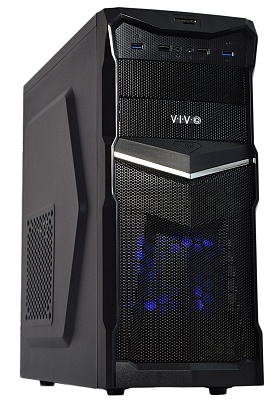
The mid-tower case shown here is the one I just bought for a new computer I'm building. It has two fans (plus a port
for a third, should I need it); room for 7 expansion slots (which may be limited by the size of the motherboard);
2 internal optical drive bays and 3 internal hard drive bays; 4 USB connectors on front (2 USB 2.0; 2 USB 3.0);
a reader for SD cards (so you can easily access the photos in your digital camera); and it uses thumbscrews
for easy back-panel access.
When Good Cases Go Bad
Once the case has been stuffed with computer thingies, there's really only one thing that can go wrong with it
(apart from dropping it into a swimming pool): It can allow the computer components to overheat. Fans can fail; but the
main reason I've seen for overheating cases is dust. Yes, those dust bunnies you may remember from beneath your
childhood bed have found a better place to hide.
How can you tell if your computer is overheating? Well, it might just tell you; many modern motherboards
report errors if the temperature is out of range. However, the symptom of an overheated computer is primarily "odd"
behavior. If you save a file and it becomes corrupted, an easy first check is to remove the side panel and see if
the interior isn't coated with dust. While there, turn the computer on and make sure the fan or fans are, in fact, turning.
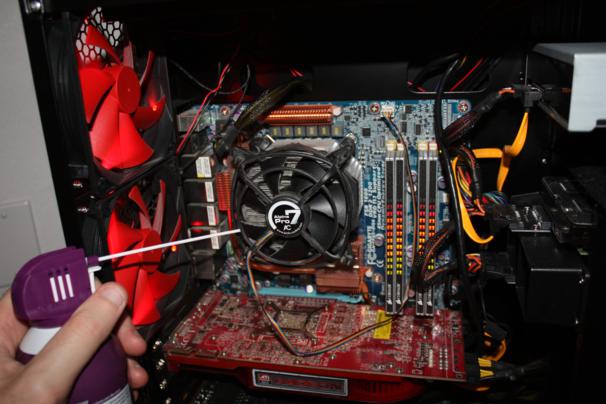
Fortunately, there's an easy fix for dust. Pick up a can of air (from an electronics store, or the electronics
section of a department store), put on a mask or hold your breath, and spray away.
There's also a simple fix for broken fans: They can be replaced, either by you, or by your computer technician.