|
By: Paul S Cilwa |
Posted: 9/6/2026 |
|
Page Views: 331 |
| Hashtags: #Software #Music #ReplayGain #Loudness #Normalize #FLAC #MP3 #Volume #Silence #Mono |
| A free tool that evens out the volume of your music library, album by album, and tidies the tracks while it's there. |
| Estimated reading time: 7 minute(s) (1483 words) |
Music Minder is a free desktop tool that makes every album in your music
library play at the same volume, without touching the music itself—and, if
you ask it to, trims the dead air off the ends of tracks and even folds 'electronic' (fake) stereo
back to mono.
What It Does
That note is called ReplayGain, and nearly every music player honors
it—foobar2000, MusicBee, Plex, VLC, Winamp, MediaMonkey, most phone players, and
so on.
Using It
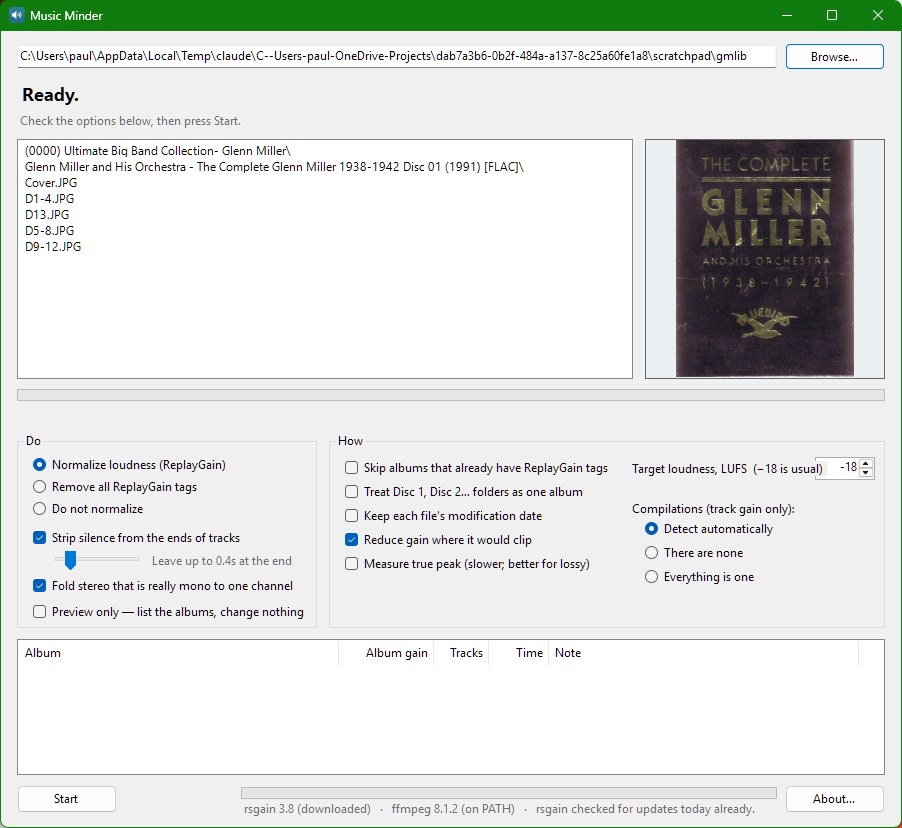
Drop a folder on the window. It can be a single album, an artist's whole
shelf, or the entire library. Whatever you drop, the window shows what's inside it
and the first cover it finds, and waits. Nothing starts until you press
Start, so there's time to read the options first.
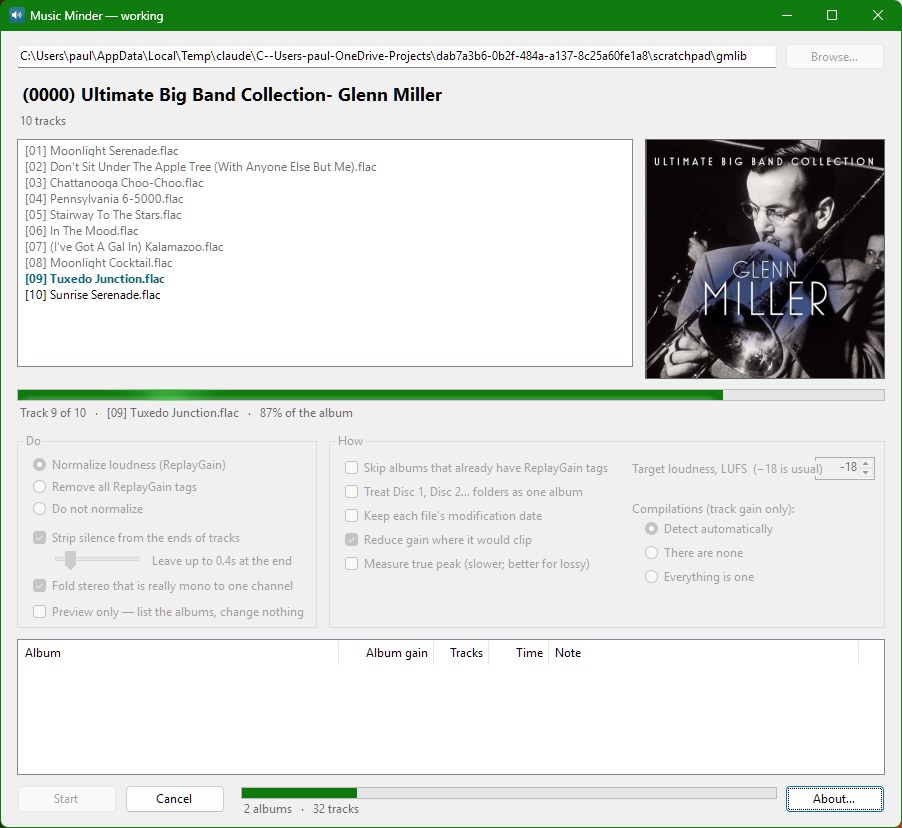
Press Start. Music Minder walks the folders, decides what's an album, and
works through them one at a time. While it does, you see the album's cover and its
track list, with the track being measured picked out and finished ones greyed; a
bar for the album and a bar for the whole job; and a list of everything done so far
with each album's gain. It goes at a few hundred times real time, so a whole
library is an afternoon rather than a week.
Come back to it whenever you like. Albums that already have their note are
skipped, so if you stop half way—or add a hundred albums next month—you
just drop the library on it again and it picks up where it left off. An album with
even one untagged track is measured again in full, so the numbers are never
half-and-half.
Album Gain, Track Gain, and Compilations
There are two ways to even out the volume, and Music Minder chooses between them
for each album.
Album gain measures the whole album as one piece and writes the same
adjustment into every track. The album as a whole lands at the standard volume, but
the quiet song stays quieter than the loud one, exactly as the band and their
producer meant. This is what a real album gets.
Track gain brings every song to the same volume on its own. On a real album
that's wrong—it flattens the rise and fall that was sequenced into the
record—but on a compilation it's exactly right, because there the differences
between tracks aren't anyone's intention; they're just twelve masterings from twelve
years. Music Minder spots compilations by where they're filed (a
Various Artists folder), by their tags (an album artist of "Various
Artists", or different artists across the tracks), and by their titles
(Greatest Hits, Best Of, Anthology…), and gives those
track gain only. You can override it either way.
Film scores and cast recordings are treated as albums, not compilations, because
they are.
Tidying the Tracks
Two more things Music Minder can do, both off by default, because both change the
audio itself:
Strip silence from the ends of tracks. Ripped CDs and old transfers often
carry a second or three of nothing at the start and end of each track. Music Minder
cuts the start clean and trims the end down to whatever you set on the
slider—half a second, unless you say otherwise—so tracks follow each
other the way they should without slamming into one another. It never
adds silence: a track that was already cut tight, or that runs straight into
the next one, is left exactly as it is. Classical albums are left alone
altogether, since there the pause between movements is part of the music.
Lossless files (FLAC, WAV, AIFF, Apple Lossless) are re-encoded exactly; MP3s and
other lossy files are cut at frame boundaries with no re-encoding, so nothing is
lost twice.
Fold stereo that is really mono to one channel. A great deal of old music
was recorded in mono and then stored as stereo with the same sound in both
channels, taking twice the space for nothing. Music Minder checks whether the two
channels actually differ—it's careful about this; genuine stereo, however
narrow, is never touched—and folds the ones that don't. Lossless formats
only; folding an MP3 would mean encoding it a second time, so those are reported
and left as they are.
Any track that's changed has its ReplayGain note removed, so the next measuring
pass looks at the track as it now is. And every rewrite goes to a temporary file
first and replaces the original only once it's been checked, so a crash or a bad
encode can't cost you a song.
Grading
Grade quality and set folder icons does, in passing, what my
Analyze Audio tool did on its own: every track is graded
by its bitrate—gold for genuine hi-res, silver for CD-quality lossless, black
for ordinary lossy, tan for the poor stuff—and each album folder gets a
pie-chart icon showing the mix, with the album's own cover standing in at the
largest size. Artist folders, and the library itself, get icons rolled up from
everything beneath them, so you can see at a glance where the weak spots are
without opening a single folder. Hover over any of them and the tooltip gives the
percentages.
Artist Credits
Format artist credits as Artist; Guest; Guest tidies the one tag that
every source gets wrong differently. A guest belongs in the artist field, not the
song's name; so "Song (feat. Guest)" becomes "Song", and Guest joins the artist
as "Artist; Guest". "Artist feat. Guest", "featuring", "ft." and a bracketed
"(with Guest)" or "(duet with Guest)" in the artist field all become the same
"Artist; Guest". And fields that
some taggers store as several values—the ones that show up as
"Artist // Guest" in other programs—come back as one field with your
semicolons in it.
It is careful about what it doesn't know. Simon & Garfunkel stays Simon &
Garfunkel, AC/DC stays AC/DC, Sleeping With Sirens stays a band and "Dancing With
Myself" keeps its title. A bare "with" is never taken as a guest, only a bracketed
one; and an ampersand or a comma only separates people inside a guest clause,
where that's what it means. Anywhere else it's part of a name.
Other Options
- Remove all ReplayGain tags—undoes everything, album by album,
if you decide you'd rather not.
- Treat Disc 1, Disc 2… folders as one album—so a box set
gets one album gain, not one per disc.
- Keep each file's modification date—so your backup program
doesn't see the whole library as new.
- Preview only—lists what it would do and changes nothing. A good
first run on a big library.
- Target loudness, clipping protection and true-peak measurement, for
those who know what they want.
Every option is remembered between runs, and a log of every run is kept and
can be opened from the window when it's done.
What's Inside
The measuring is done by rsgain,
an open-source scanner that carries the same loudness engine the broadcasters use.
A copy comes with Music Minder, and when a newer release appears the program
fetches it on its own. Trimming and folding are done by ffmpeg, which is on most
machines already and is downloaded the first time it's needed if not. The
How It Works page has the details, for the curious.
Download
If you'd like to try Music Minder, grab the installer below. It needs 64-bit
Windows and nothing else—everything it depends on is inside the installer,
so there is no runtime to chase down first, and it installs for you alone, so no
administrator password is asked for.
How Music Minder Works
|
By: Paul S Cilwa |
Posted: 9/6/2026
Updated: 10/25/2026 |
|
Page Views: 157 |
| Hashtags: #Software #Music #ReplayGain #rsgain #ffmpeg #Loudness #EBUR128 #FLAC #MP3 |
| What Music Minder actually does to your files, in what order, and what it leans on to do it. |
| Estimated reading time: 8 minute(s) (1719 words) |
Music Minder is mostly a conductor. The measuring is done by a
program called rsgain and the audio surgery by ffmpeg; Music Minder decides what
an 'album' is, what to do to it, in what order, and shows you what's happening, while it's happening.
This page is for anyone who wants to know exactly what that means for their
files.