|
By: Paul S Cilwa |
Posted: 10/5/2026
Updated: 10/25/2026 |
|
Page Views: 83 |
| Hashtags: #Software #DesktopMinder #Email #Compose #Drafts #Outbox #Attachments |
| Writing mail in Desktop Minder: a message being written is a document, kept as a draft as you go, and sent at once or as soon as the network comes back. |
| Estimated reading time: 4 minute(s) (759 words) |
Starting One
New Message is on the right-click menu of a mailbox and of its Outbox, and Document > New > Email makes one in the Outbox. Reply, Reply All and Forward are on the right-click menu of a message, when one message is picked out. Each opens a message to write, in the View, and its tab says what it is: New Message, Reply, Forward, or Draft for one taken up again. A message is written in the Outbox from the start, so there is no step in the Drafts basket. A reply puts "Re:" in front of the subject once, not again and again,
quotes the message it answers, goes to the address the sender asked replies to go
to, and carries the threads that let other mail programs file it with the
original.
The Sheet
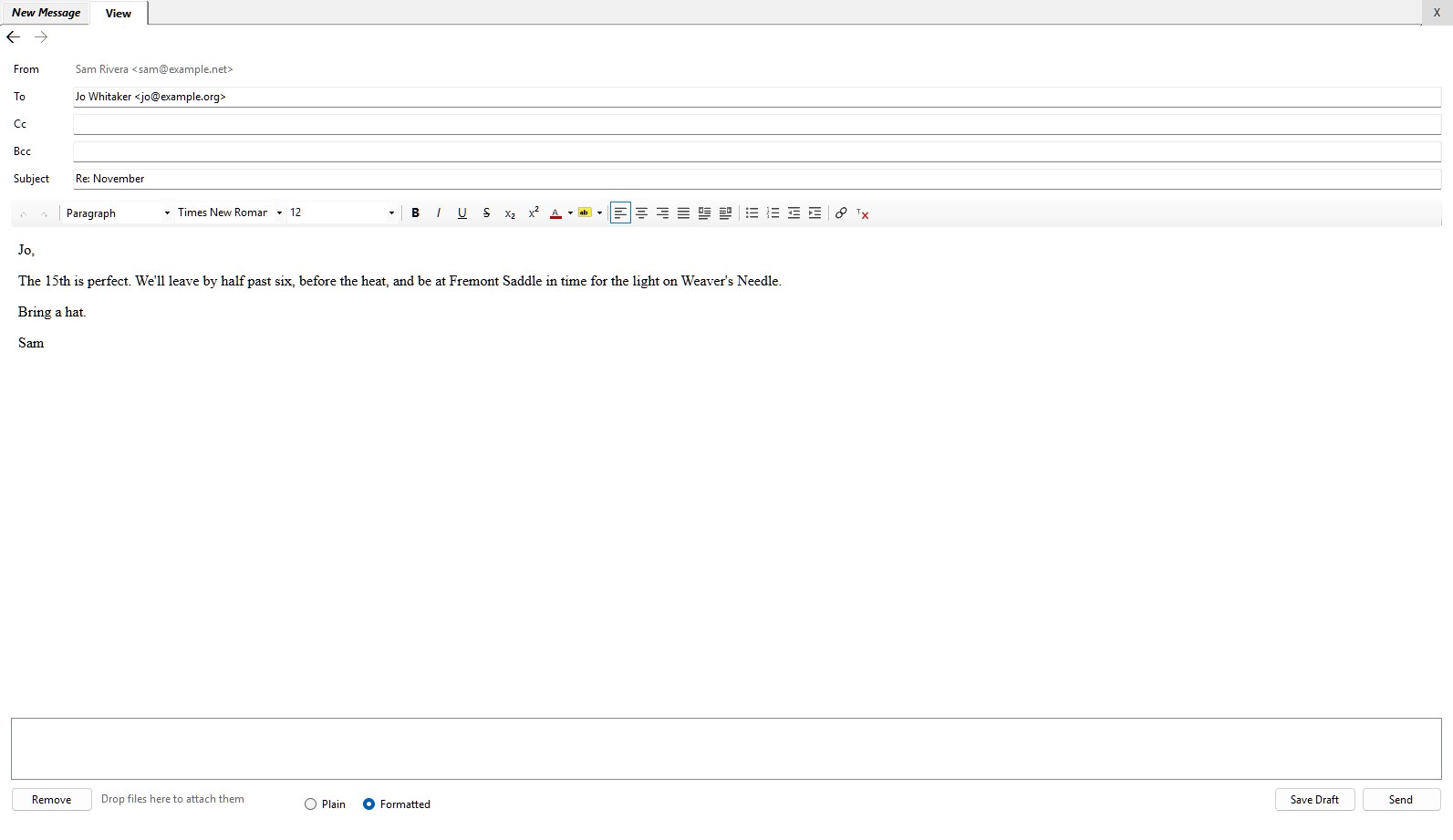
The message is laid out the way you'd expect. From is the mailbox it was
started in; below it are To, Cc, Bcc and Subject, and
then the message itself. There's a list of attachments, with Attach... and
Remove and a running total—"2 files, 3.4 MB of 20"—and there are
Plain and Formatted, Save Draft and Send, and a line
that says how things stand.
Plain or Formatted
The message is written in the same paragraph editor as a web page's
Edit tab. With
Formatted chosen it shows its toolbar, for styles, emphasis and lists, and the
message goes out as a formatted page with the plain words beside it, for mail
programs that want them. Switching to Plain asks first, because "Plain text
has no bold, lists or links: the words stay and the formatting goes." The choice is
remembered for the next message, and starts as Plain; a reply to formatted mail
starts formatted.
Keeping It
A message being written is kept in the Outbox, as a draft the sender passes over, half a
minute after you stop typing, when you press Save Draft, and whenever you put it
down—close it, open something else, switch desktops or close the program. It isn't
sent until you press Send, which makes it ready. Double-click a message in the
Outbox that hasn't gone and you're writing it again, attachments and all. Clear a draft
of everything and it's deleted, rather than left behind as an empty message.
Sending
Send looks the message over first, and says in words what's wrong, if
anything is: no address, an address that can't be right, attachments over the limit.
Then it puts the message in the Outbox and locks the sheet: "Sending... If the network
is not there it waits in the Outbox and goes when it returns. How it went will be
said here." And when the sending is over, the sheet says how it went, with the time.
Every sending is also written down, with the server's own reply, in a log on this
computer, which is what there is to go on when a message doesn't arrive. It goes at
once, if it can. If there's no network, it waits,
and goes a few seconds after Windows says the network is back; and every
Check Mail sends anything still waiting, too. A mailbox nobody has signed into
says so; once someone has, the mail goes with the next Check Mail, the next time the
network comes back, or at once with Send Again. Once it's gone, it's in
Sent.
If the server refuses a message, it isn't tried again and again on its own; the
reason is given at the foot of the window, and Send Again, on a message in the
Outbox, puts it back in line.
Attachments
Attach... adds files, several at a time, up to twenty megabytes in all. Files dropped on the sheet are attached too. A picture dropped on the words of the message is placed where you drop it and goes as part of the message, rather than as an attachment.
Not Yet
- Addresses filled in from your contacts as you type them in To, Cc
and Bcc. It's designed; it isn't built.
- Signatures, templates, sending later, read receipts and sending from another
address, none of which were meant for the first version.